Write on plain paper
Use clean, unlined white paper when possible. Notebook lines and printed patterns can be mistaken for part of the signature.
Remove the paper or image background from a handwritten signature. Upload a scan or photo, let PxBee isolate the handwriting, and create a transparent PNG for authorized documents and personal designs.
The tool prepares a visual signature image; it does not verify identity, record consent or create a signing audit trail.
PxBee’s Signature Background Remover separates your handwriting from the surrounding paper, shadow or image background.
The result is a transparent signature image that can be placed over another authorized document or design without showing a white rectangular box.
You can use it for letters and internal documents, email footers, personal stationery, presentation slides, authorized forms, invoices and estimates, personal branding, cards and design projects.
This tool prepares a signature image. It does not verify identity, capture consent or provide a document-signing audit trail.
Use a clear source, inspect every pen stroke and export in a format that retains transparency.
Choose a JPG, JPEG, PNG or WebP image containing your handwritten signature. You can select, drop or paste the supported image.
PxBee detects the handwriting and separates it from the surrounding paper or image automatically.
Confirm that the full signature remains visible and that unwanted shadows, lines and paper texture have been removed.
Save the cleaned signature as a PNG when you need the background to remain transparent.
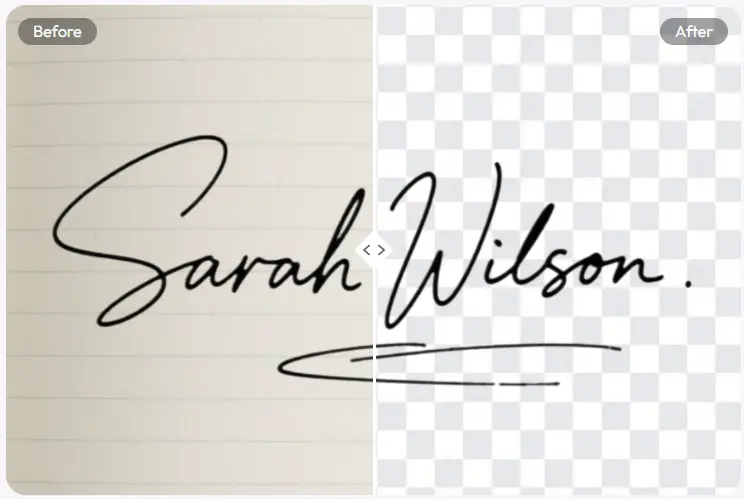
Sample Fictional demonstration only—never publish another person’s genuine signature.
Thin pen strokes are easier to retain when the source is sharp, evenly lit and clearly separated from the paper.
Use clean, unlined white paper when possible. Notebook lines and printed patterns can be mistaken for part of the signature.
Black or dark-blue ink usually creates stronger contrast against white paper and clearer separation around thin strokes.
Photograph the signature in soft, even light. Avoid harsh shadows created by your phone, hand or nearby objects.
A straight camera angle reduces perspective distortion and keeps the signature’s natural shape.
Tap the signature on your phone screen before taking the picture. Fine pen strokes are difficult to recover from a blurry image.
Leave a small margin around the signature while removing unrelated writing, page edges and nearby objects.
A transparent signature can be inserted into certain documents when that signing method is accepted. Always confirm the document’s requirements before using an image-based signature.
Add it as a visual sign-off in a personal email footer. Optimize the dimensions so it is not oversized or unnecessarily slow to load.
Place your signature on thank-you letters, personal notes or stationery templates you control.
A transparent signature can provide a personal finishing touch where a signature image is appropriate and accepted.
Use your own signature on authorized slides, awards or certificates. Do not copy or reuse another person’s signature.
A handwritten signature can become a visual element in a personal portfolio, creator page or brand identity when you own the signature and related rights.
These terms are related, but they are not interchangeable.
A transparent signature is a raster image—usually a PNG—containing visible handwriting with no paper background.
It is a reusable visual asset. By itself, it does not prove who placed it on a document.
An electronic signature is an electronic sound, symbol or process associated with a record and used by a person with the intent to sign.
A signature image may form part of that process, but legal effectiveness can depend on consent, attribution, retention and record requirements.
A digital signature commonly refers to a cryptographic method that can help verify document integrity and signer identity through certificates and related technology.
PxBee does not create cryptographic digital signatures or document audit trails.
The U.S. E-SIGN Act generally prevents a signature or contract from being denied legal effect solely because it is electronic, but it does not mean every pasted signature image is automatically valid for every transaction. See 15 U.S.C. § 7001 ↗. This page is not legal advice.
Simple tools for preparing a reusable visual signature asset—not an electronic-signature platform.
PxBee identifies the signature as the foreground and attempts to remove the surrounding background.
PNG supports transparent pixels, allowing the signature to appear without a paper-colored rectangle.
The current upload interface supports JPG, JPEG, PNG and WebP files.
Remove the background online without opening a complex desktop image editor.
Save a cleaned version for appropriate, authorized documents and personal designs.
The page is designed specifically for handwriting rather than general product or portrait background removal.
PxBee does not publicly identify the exact AI model used by this tool. Its function can be described through the observable editing process.
This process can be less predictable when a signature is faint, blurred or placed over textured paper.
Learn how transparency worksThe editor identifies handwriting or dark foreground marks that may belong to the signature.
It separates likely signature pixels from the paper or image background.
The tool builds a transparency mask around curves, loops and pen strokes.
Background pixels are converted to transparency while the detected signature remains visible.
Review or retry the result when the source includes:
Try retaking the photo with better lighting or scanning the signature on plain paper.
Use this page for signature-specific extraction and choose the specialist workflows below for broader image tasks.
Use the Transparent Background Maker for products, people, pets and other image types.
Transparent Background Maker →02Use PNG Maker when converting a general image into a transparent PNG is your primary goal.
Open PNG Maker →03Use the White Background Remover for general images with white backgrounds.
White Background Remover →04Try AI Photo Enhancer when the source is soft or unclear. Enhancement cannot reliably restore strokes that were never captured.
Open Photo Enhancer →For product photos, portraits and other subjects, use the main Background Remover.
Upload a scan or photo of your handwritten signature, remove the surrounding paper and create a clean transparent PNG for an authorized document or personal design.
JPG, JPEG, PNG and WebP supported